DNS Overload in Kubernetes: Autoscale CoreDNS with 2 Nodes per 1 Pod
Pods start throwing i/o timeouts because two fixed CoreDNS replicas cannot keep up with a growing cluster. Fix it with the cluster-proportional-autoscaler: one CoreDNS pod for every 2 nodes.
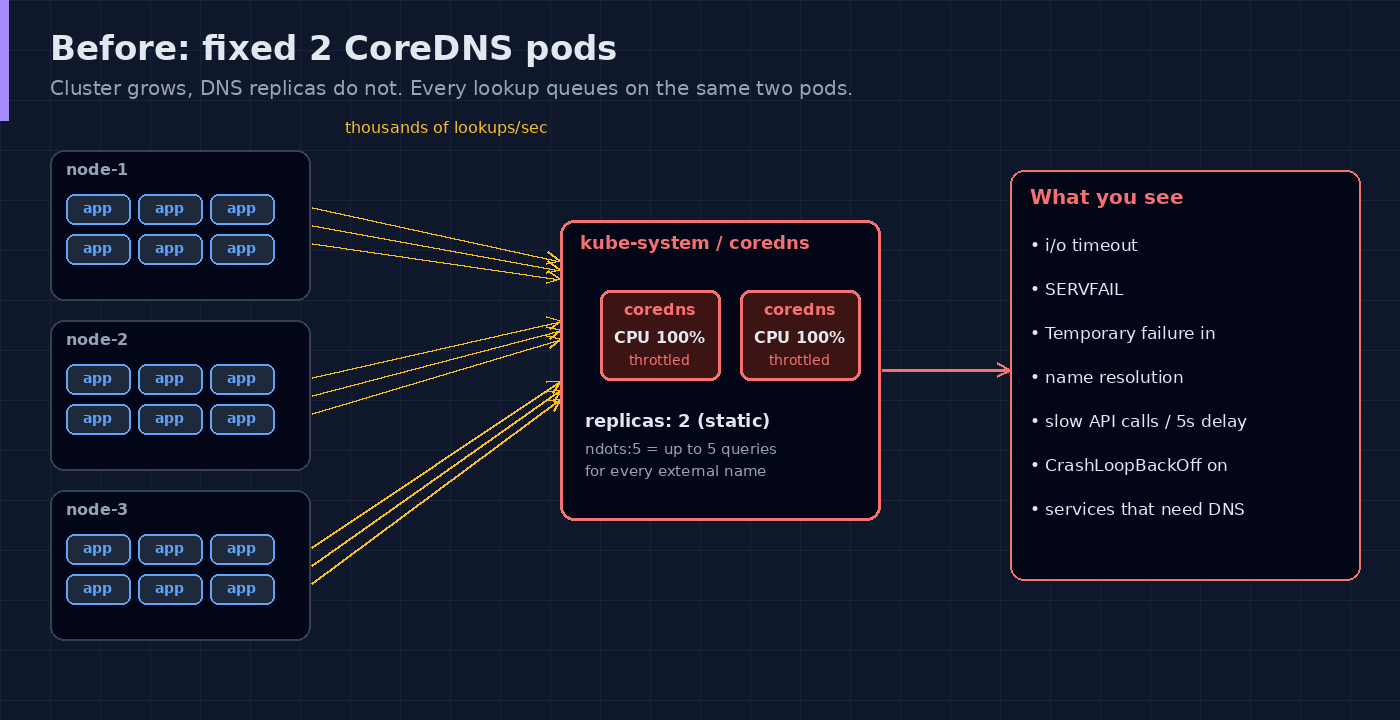
When a cluster grows, the application pods grow with it. CoreDNS usually does not. It stays at the 2 replicas it was installed with, and every pod in the cluster sends its lookups to those same 2 pods. At some point DNS becomes the bottleneck and the symptoms look like an application problem.
Here, we will find out if CoreDNS is overloaded, and fix it by scaling CoreDNS with the number of nodes: 2 nodes, 1 pod.
Symptoms
- Random
i/o timeout,SERVFAILorTemporary failure in name resolutionfrom pods. - Calls to other services or external APIs are slow for a few seconds, then work on retry.
- Pods that need DNS at startup go into
CrashLoopBackOff. - It gets worse when the cluster scales out or during a deployment rollout.
One thing that multiplies the load: pods get ndots:5 in /etc/resolv.conf by default. A name with fewer than 5 dots is tried against the search domains first, so one external lookup can turn into several queries to CoreDNS.
Step 1: Check CoreDNS
kubectl get deployment -n kube-system -l k8s-app=kube-dns
kubectl get pods -n kube-system -l k8s-app=kube-dns -o wide
kubectl top pods -n kube-system -l k8s-app=kube-dns
kubectl logs -n kube-system -l k8s-app=kube-dns --tail=50
kubectl get nodes --no-headers | wc -l
If CPU is at or near the limit and the replica count is still 2 while you have many nodes, this is your problem. kubectl top needs metrics-server.
Test from a pod:
kubectl run dnstest --rm -it --image=busybox:1.36 --restart=Never -- sh -c 'for i in 1 2 3 4 5; do time nslookup kubernetes.default; done'Step 2: Check if an autoscaler already exists
kubectl get deployment kube-dns-autoscaler -n kube-systemIf it exists, you only need to tune its ConfigMap (step 4). If not, the output is NotFound and we deploy it.
The fix: cluster-proportional-autoscaler
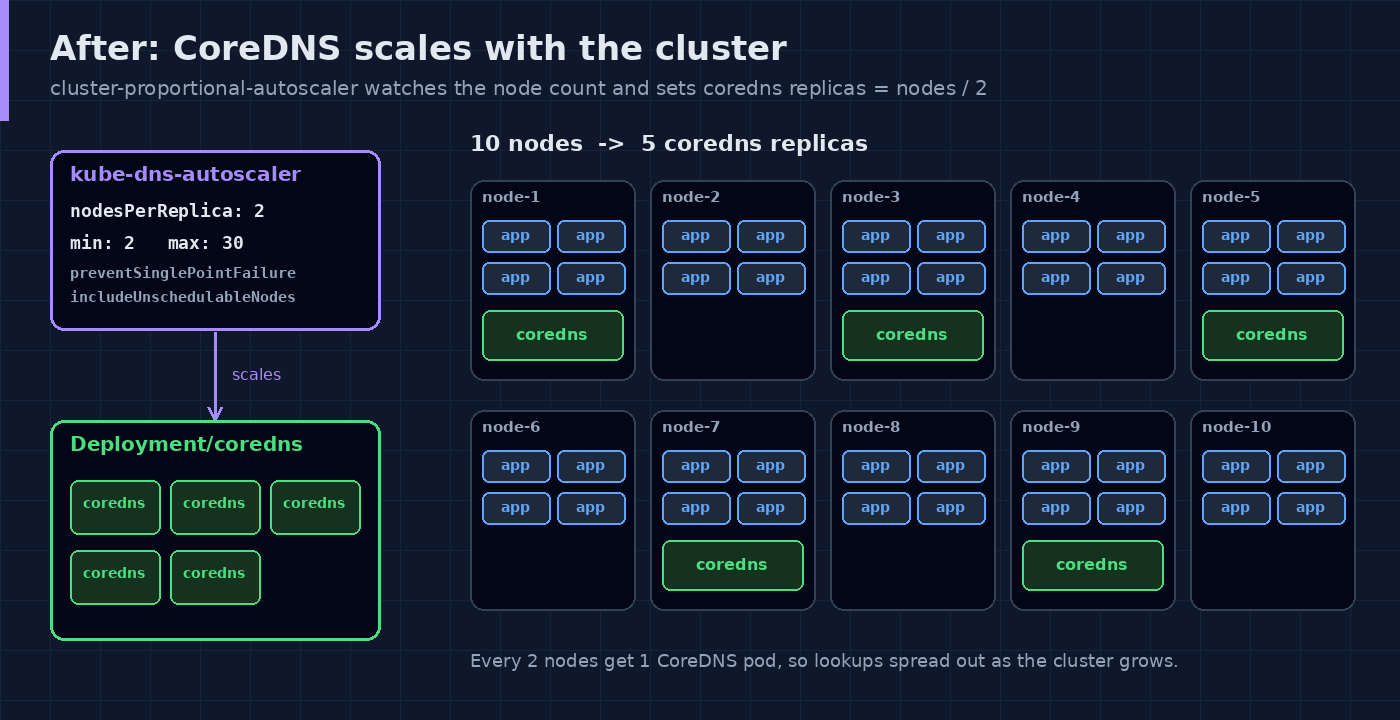
Kubernetes documents this as the way to autoscale the DNS service. It is a small pod that watches the number of nodes and cores and sets the replicas of a target Deployment. It does not use CPU metrics, so it does not need metrics-server.
In linear mode the formula is:
replicas = max( ceil( cores * 1/coresPerReplica ) , ceil( nodes * 1/nodesPerReplica ) )For 2 nodes : 1 pod we set nodesPerReplica: 2 and keep coresPerReplica high, so the node count decides.
Step 3: Deploy it
Save as dns-autoscaler.yaml:
apiVersion: v1
kind: ServiceAccount
metadata:
  name: kube-dns-autoscaler
  namespace: kube-system
---
apiVersion: rbac.authorization.k8s.io/v1
kind: ClusterRole
metadata:
  name: system:kube-dns-autoscaler
rules:
  - apiGroups: [""]
    resources: ["nodes"]
    verbs: ["list", "watch"]
  - apiGroups: [""]
    resources: ["replicationcontrollers/scale"]
    verbs: ["get", "update"]
  - apiGroups: ["apps"]
    resources: ["deployments/scale", "replicasets/scale"]
    verbs: ["get", "update"]
  - apiGroups: [""]
    resources: ["configmaps"]
    verbs: ["get", "create"]
---
apiVersion: rbac.authorization.k8s.io/v1
kind: ClusterRoleBinding
metadata:
  name: system:kube-dns-autoscaler
subjects:
  - kind: ServiceAccount
    name: kube-dns-autoscaler
    namespace: kube-system
roleRef:
  kind: ClusterRole
  name: system:kube-dns-autoscaler
  apiGroup: rbac.authorization.k8s.io
---
apiVersion: apps/v1
kind: Deployment
metadata:
  name: kube-dns-autoscaler
  namespace: kube-system
  labels:
    k8s-app: kube-dns-autoscaler
spec:
  selector:
    matchLabels:
      k8s-app: kube-dns-autoscaler
  template:
    metadata:
      labels:
        k8s-app: kube-dns-autoscaler
    spec:
      priorityClassName: system-cluster-critical
      serviceAccountName: kube-dns-autoscaler
      containers:
        - name: autoscaler
          image: registry.k8s.io/cpa/cluster-proportional-autoscaler:1.8.4
          resources:
            requests:
              cpu: 20m
              memory: 10Mi
          command:
            - /cluster-proportional-autoscaler
            - --namespace=kube-system
            - --configmap=kube-dns-autoscaler
            - --target=deployment/coredns
            - --default-params={"linear":{"nodesPerReplica":2,"min":2,"max":30,"preventSinglePointFailure":true,"includeUnschedulableNodes":true}}
            - --logtostderr=true
            - --v=2
kubectl apply -f dns-autoscaler.yaml
kubectl get deployment kube-dns-autoscaler -n kube-system
kubectl get configmap kube-dns-autoscaler -n kube-system -o yaml--target=deployment/coredns must match the real name of your CoreDNS Deployment. Check it in step 1. Some distributions name it kube-dns.
Step 4: Tune the ratio
The autoscaler reads its parameters from the ConfigMap, so you can change them without redeploying:
kubectl edit configmap kube-dns-autoscaler -n kube-systemChange the linear key:
data:
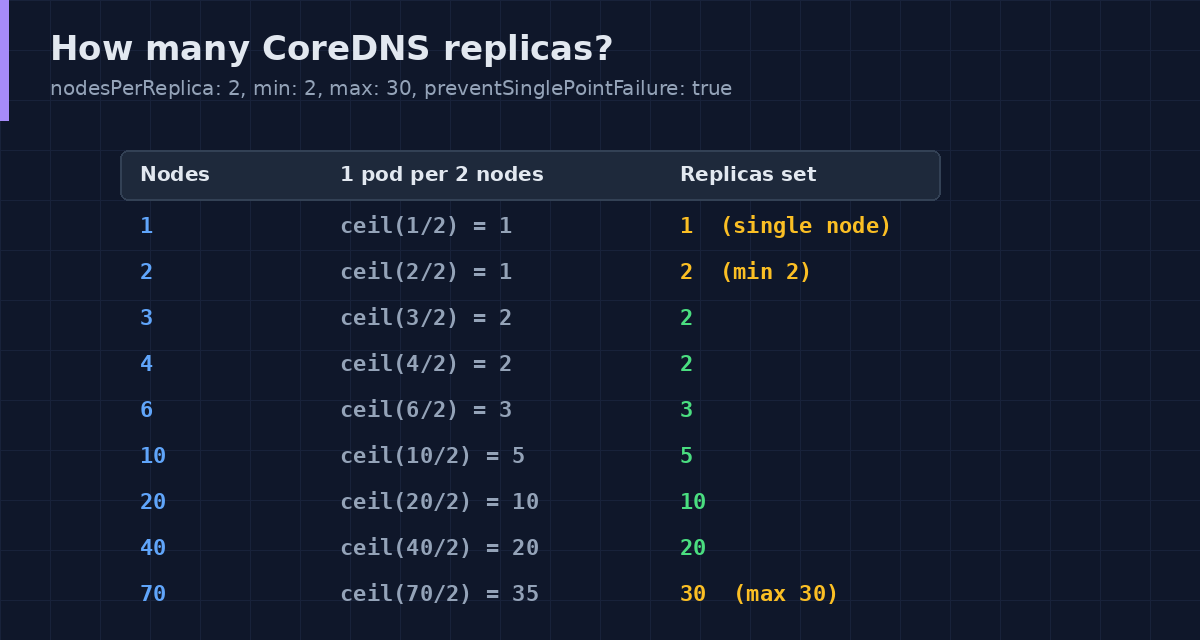
linear: '{"coresPerReplica":256,"nodesPerReplica":2,"min":2,"max":30,"preventSinglePointFailure":true,"includeUnschedulableNodes":true}'- nodesPerReplica: 2 is the 2 nodes : 1 pod ratio.
- min: 2 because a 2 node cluster would give
ceil(2/2) = 1replica, which is a single point of failure.preventSinglePointFailurealso forces at least 2 replicas when there is more than one node. - max: 30 is a safety cap, so a big scale out does not create hundreds of DNS pods. Pick your own number.
- includeUnschedulableNodes: true scales on the total node count, not only schedulable nodes.
Step 5: Verify
kubectl logs -n kube-system deploy/kube-dns-autoscaler --tail=20
kubectl get deployment coredns -n kube-system
kubectl get nodes --no-headers | wc -l
kubectl get pods -n kube-system -l k8s-app=kube-dns -o wide
The replica count of CoreDNS should match the table above for your node count. The autoscaler checks every 10 seconds by default (--poll-period-seconds).
Things to watch
- Do not scale CoreDNS by hand. The autoscaler owns the replica count and will change it back. Change the ConfigMap instead.
- Spread the pods. If all CoreDNS pods land on one node, you lose them together. Use
topologySpreadConstraintsor pod anti-affinity on the CoreDNS Deployment. - PDB and rollouts. Keep a PodDisruptionBudget on CoreDNS so node drains do not remove every DNS pod at once.
- Managed clusters. EKS, GKE and AKS ship their own CoreDNS or kube-dns setup, and some already autoscale it. Check what you have in step 2 before adding a second controller.
- Reduce the load too. Scaling CoreDNS handles the number of queries. NodeLocal DNSCache and fully qualified names (a trailing dot) reduce the number of queries.
Rollback
kubectl scale deployment kube-dns-autoscaler --replicas=0 -n kube-system
kubectl scale deployment coredns --replicas=2 -n kube-system
Scaling the autoscaler to 0 disables it, as described in the Kubernetes docs. To remove it completely, run kubectl delete -f dns-autoscaler.yaml.
References: Autoscale the DNS Service in a Cluster and cluster-proportional-autoscaler.