Radar MCP Server: Let AI Agents Read Your Kubernetes Cluster with kubectl radar
Install Radar with kubectl radar, connect its built-in MCP server to Claude Code, Copilot or Cursor, and keep it safe with read-only mode and RBAC.
Giving an AI agent raw kubectl access is risky and wasteful. kubectl get pod -o yaml dumps managed fields and noise that burn the context window, and the same credentials can delete things. Radar is an open-source Kubernetes UI with a built-in MCP (Model Context Protocol) server, and it fixes both problems. We run it as kubectl radar on our own machine, so nothing is installed in the cluster.
Here, we will install Radar, connect an AI tool to its MCP server, and lock it down to read-only.
What is Radar
- A single Go binary with the web UI embedded. It uses your existing kubeconfig, the same way kubectl does.
- No CRDs, no agents in the cluster and no account needed for local mode.
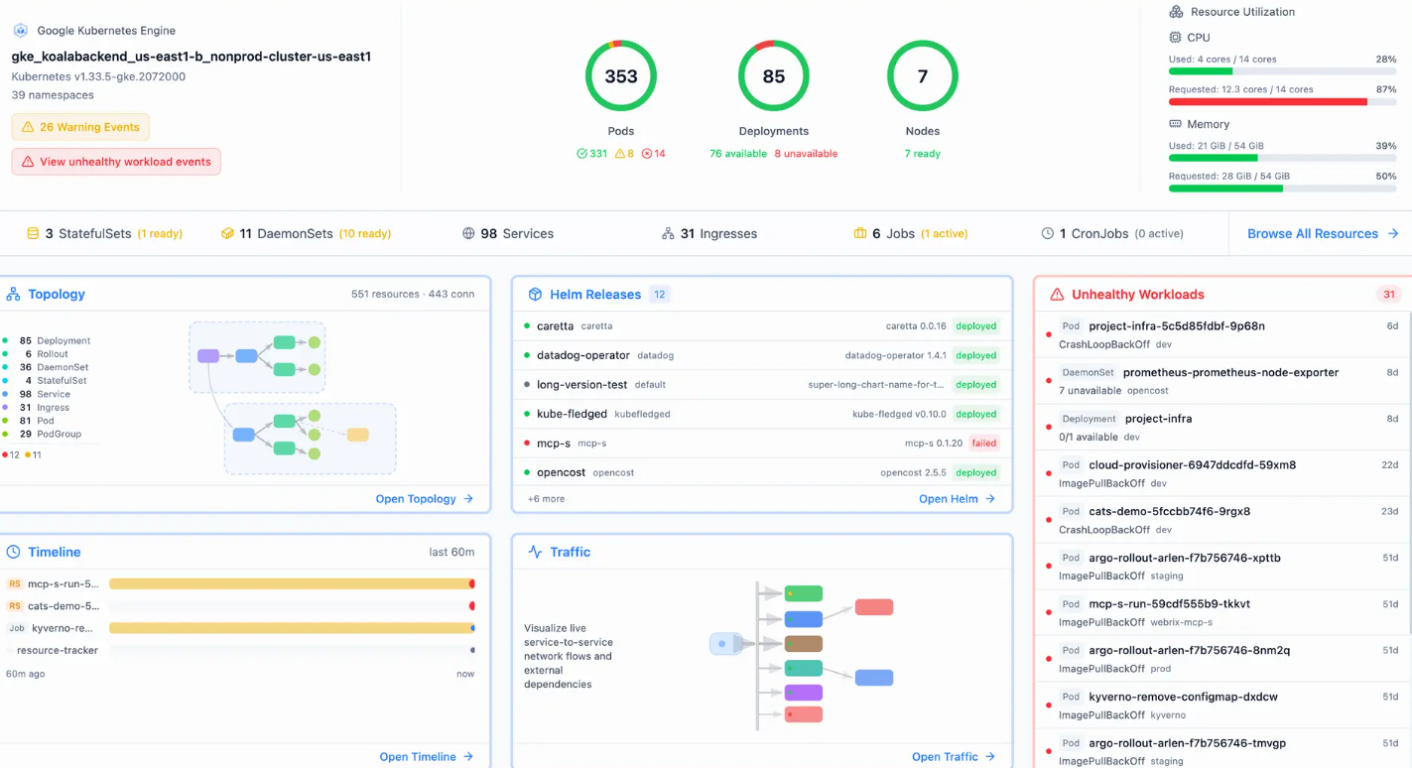
- The UI covers topology, resources, events timeline, Helm, GitOps (Argo CD and Flux), traffic and audits.
- The MCP server is enabled by default when Radar starts.
Why MCP instead of raw kubectl
- Fewer tokens: resources are minified. Managed fields and internal annotations are stripped.
- Better context: topology, health assessment, de-duplicated events and logs that prioritise errors and warnings.
- Secret-safe: Secret data is never exposed, env values are redacted and log output is scrubbed for API keys and tokens.
- RBAC-aware: write actions such as restart, scale, apply and rollback are enforced through Kubernetes RBAC.
Install Radar
Pick one. Quick install:
curl -fsSL https://get.radarhq.io | shHomebrew:
brew install kubectl-radarKrew (kubectl plugin manager):
kubectl krew install radarQuick install writes to /usr/local/bin unless INSTALL_DIR is set. Whatever directory is used must be on your PATH.
Start it
kubectl radarThis opens the dashboard for whatever context is active in your kubeconfig. The default port is 9280. To use another port or only one namespace:
kubectl radar --port 9290 --namespace defaultThe MCP endpoint is now available at:
http://localhost:9280/mcpRadar must keep running while the AI tool is using it. Radar logs a warning that remote clients can access it without authentication, so keep it on localhost and do not expose the port.
Connect your AI tool
Claude Code:
claude mcp add --transport http radar http://localhost:9280/mcpGitHub Copilot CLI (writes to ~/.copilot/mcp-config.json):
copilot mcp add --transport http radar http://localhost:9280/mcpCodex:
codex mcp add radar --url http://localhost:9280/mcpVS Code (GitHub Copilot), add this to .vscode/mcp.json in the workspace:
{
  "servers": {
    "radar": {
      "type": "http",
      "url": "http://localhost:9280/mcp"
    }
  }
}
Cursor, add this to ~/.cursor/mcp.json:
{
  "mcpServers": {
    "radar": {
      "url": "http://localhost:9280/mcp"
    }
  }
}
Radar's docs also cover Claude Desktop, Zed, Gemini CLI, Cline, Kiro and others.
Keep it read-only
For production clusters this is the part to do. Start Radar with:
kubectl radar --mcp-read-onlyIn this mode the AI tool must use http://localhost:9280/mcp-readonly, and the full /mcp endpoint returns 404. Update the client config to use the new URL:
claude mcp add --transport http radar-ro http://localhost:9280/mcp-readonlyNote that this setting restricts the MCP side only. It does not restrict writes in the Radar UI or REST API. To turn MCP off completely, use --no-mcp. You can also set RADAR_MCP_READ_ONLY=1, or "mcpReadOnly": true in ~/.radar/config.json. Since writes go through your kubeconfig identity, a read-only ServiceAccount or kube context gives one more layer.
What the agent can do
We started Radar's catalog mode (radar --mcp-catalog-only, version 1.18.1) and listed the tools. The full endpoint has 34 tools, and the read-only endpoint has 27 of them (no apply_resource, patch_resource or manage_*). The useful ones:
issues: what is broken right now, grouped by severity.diagnose: a point-in-time evidence bundle for one workload, GitOps reconciler or network entry.get_changes: recent changes, for "this worked earlier" problems.get_events,get_pod_logs,get_workload_logs: events and filtered logs.get_topology,get_neighborhood: relationships such as service routing and selectors.top_resources,query_prometheus,get_rightsizing: CPU and memory problems and request sizing.get_cluster_audit,get_cluster_upgrade_readiness,get_subject_permissions: posture, upgrade impact and RBAC.get_runtime_versions: which workloads run which runtime version (PHP, Node, Python, Go, Java), handy when a runtime CVE is announced.wait_for: wait for a rollout or Pod readiness after a fix, likekubectl rollout status.
The write tools are apply_resource, patch_resource, manage_workload (restart, scale, rollback), manage_node (cordon, drain), manage_gitops, manage_rollout and manage_cronjob. Radar marks these for client confirmation, so approve each one manually.
Try it
Once connected, ask in plain language:
What is broken in the cluster right now?
Why is the payments deployment in CrashLoopBackOff? Check events and logs.
What changed in the last hour in the production namespace?
Which workloads run Java 17, and in which namespaces?
Is this cluster ready for the next Kubernetes minor version?
Node drain timeouts
If the agent drains a node, manage_node waits for pod deletion with a default two minute deadline. Set the MCP client tool-call timeout and every reverse proxy in the path to at least 150 seconds. If a client times out, evictions may already have been accepted, so check the node's pods before retrying.
Other ways to run it
- In-cluster for a team:
helm repo add skyhook https://skyhook-io.github.io/helm-chartsandhelm install radar skyhook/radar -n radar --create-namespace. - Docker: works only with kubeconfigs that have embedded certificates or static tokens. EKS, GKE and AKS exec-plugin auth (
aws eks get-token) does not work inside the image, so use the native install for those clusters.
Verify
curl -s localhost:9280/api/health
claude mcp list
Radar is open source under Apache 2.0. Source and docs: github.com/skyhook-io/radar and the MCP guide.